
Best Business Bank Accounts for Digital Creators
Find the best business bank account for digital creators in 2026. Compare top options like Relay, Novo, Bluevine, and Lili—plus learn why separating business finances protects you and simplifies taxes.
Miss Manifest it All
6 min read
Choosing the best business bank account for digital creators is one of the most important financial decisions you'll make when starting your online business. Mixing personal and business finances isn't just messy—it's risky. Without clear separation, it's harder to track income, prepare for taxes, and protect your personal assets if something goes wrong.
Even if you're just starting out and haven't made your first sale yet, opening a business bank account builds the habits and paper trail of a real CEO. This guide breaks down the best business bank accounts for digital creators, what features matter most, and how to set up automated systems that make taxes and money management simple.
Why Digital Creators Need a Business Bank Account
A business bank account isn't just for "real businesses"—it's essential from day one, even if you're pre-revenue. Here's why:
Legal Protection If you have an LLC, keeping business and personal finances separate protects your personal assets. Mixing funds can pierce the "corporate veil," exposing you to personal liability.
Tax Simplification When tax season hits, you'll need a clear record of business income and expenses. A separate account makes this automatic instead of requiring you to comb through months of personal transactions.
Professional Credibility Getting paid into a business account (especially with a matching business name) builds trust with clients, platforms, and payment processors.
Better Financial Clarity You'll instantly know your business health—how much you're earning, spending, and saving—without personal expenses clouding the picture.
Easier Bookkeeping Tools like QuickBooks, Wave, or even simple spreadsheets work better when they're only tracking business transactions.
According to the FDIC: "Keeping your business funds separate from your personal funds … may limit personal liability."
The U.S. Small Business Administration reinforces this: "Business banking offers limited personal liability protection by keeping your business funds separate from your personal funds."
Bottom line: A business bank account is a foundational system every digital creator needs, regardless of income level.
...by the end, you'll know exactly which bank to choose and how to structure your accounts for growth.
Not all banks are built for digital businesses. Here’s what matters:
No monthly fees or minimums
Integrated tools for automation (think: money buckets or virtual envelopes)
Fast transfers (especially for Stripe, PayPal, or Etsy)
Mobile-friendly UI
Ability to open multiple accounts or sub-accounts (for taxes, savings, etc.)
What to Look for in the Best Business Bank Account for Creators
Pro Tip: Set up automated money buckets for taxes, paying yourself, and expenses.
This removes emotion and builds consistency.


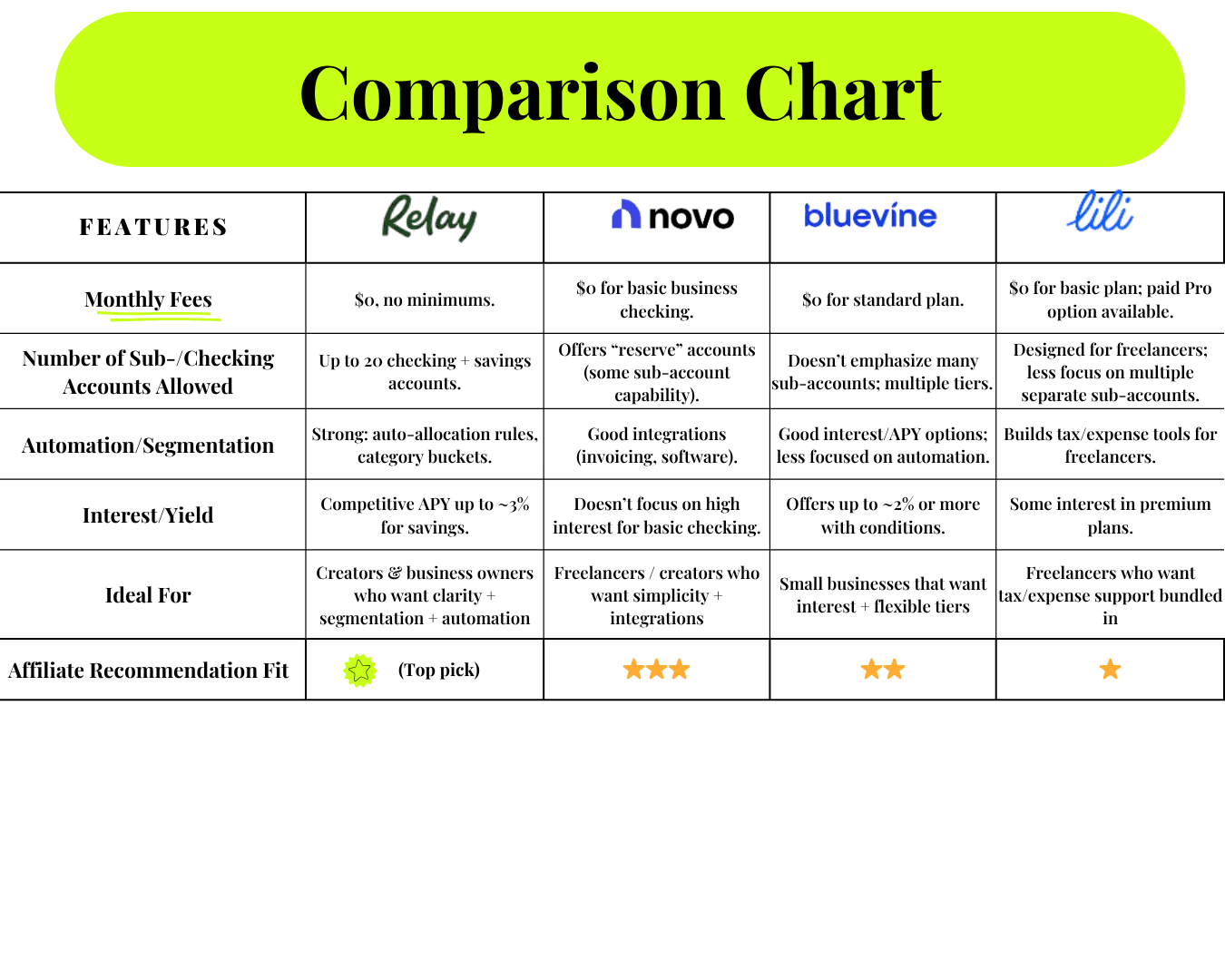
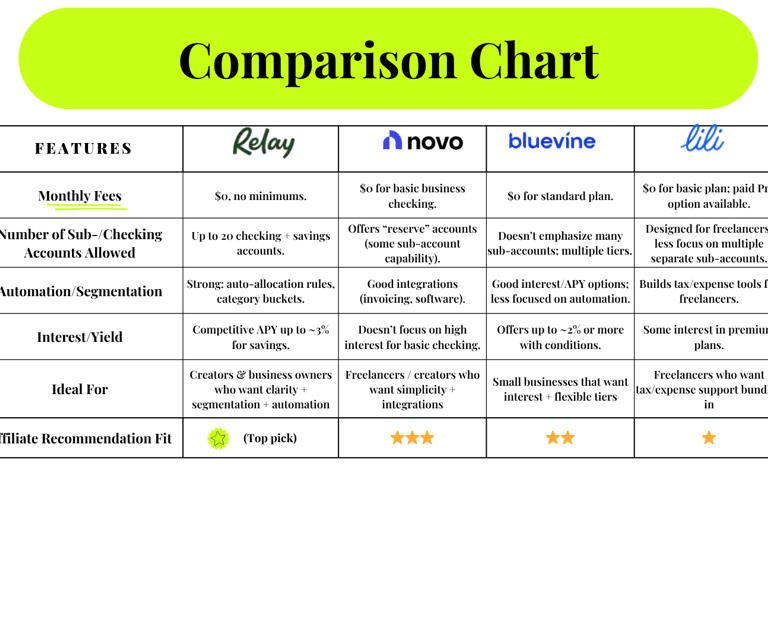
Need help deciding? Here's a visual comparison of all four banks to help you choose the best fit (click to view full screen).
*We recommend Relay for automation and digital-friendly features.
How to Choose the Right Business Bank Account for You
Not sure which bank is best for your situation? Here's how to decide:
Choose Relay if: You want maximum automation and multiple sub-accounts for Profit First budgeting (best for organized planners)
Choose Novo if: You prioritize a sleek mobile experience and integrate with Stripe/Shopify (best for e-commerce creators)
Choose Bluevine if: You want to earn interest on your balance and need vendor payment features (best for service providers with regular expenses)
Choose Lili if: You're a freelancer or solo creator who wants automatic tax savings and simple expense tracking (best for beginners)
All four options have zero monthly fees, which is essential when you're building momentum and can't afford to waste money on banking fees.
How to Set Up Tax + Owner Pay Buckets
Once you’ve opened your business bank account, create a simple routine:
Decide your income breakdown:
60% → Owner Pay
30% → Taxes
10% → Tools or Investments
Create separate accounts or buckets (Relay and Bluevine make this easy)
Set a transfer day: Every Friday, move your weekly income into these buckets.
This makes saving for taxes feel automatic—not scary.
Avoid these pitfalls that trip up new digital creators:"
Waiting until you "make enough money" - Open your account now, even pre-revenue. It's easier to set up clean systems from the start than to untangle mixed finances later.
Choosing a traditional bank with high fees - Big banks often charge $15-30/month for business accounts. Stick with creator-friendly digital banks that offer free accounts.
Not automating your money buckets - Manual transfers rarely happen consistently. Set up automatic percentage allocations so you never forget to save for taxes.
Only opening one account - You need at least 2-3 buckets: operating expenses, owner pay, and taxes. Sub-accounts prevent you from accidentally spending tax money.
Skipping the EIN - Even if you're a sole proprietor, getting an EIN (Employer Identification Number) from the IRS lets you open business accounts without using your Social Security number.
Ignoring mobile app quality - You'll check your account from your phone constantly. Make sure the app is intuitive and reliable.
Your business bank account should make money management easier, not harder.
Common Mistakes When Opening a Business Bank Account
Frequently Asked Questions About Business Bank Accounts for Creators
Do I need an LLC to open a business bank account?
No—sole proprietors can open business bank accounts too. However, some banks require an EIN (Employer Identification Number), which you can get free from the IRS in minutes.
Can I use a personal bank account for my business?
Technically yes, but it's not recommended. Mixing funds creates tax nightmares, weakens legal protection, and looks unprofessional. A business account costs $0 with the right bank.
How many business bank accounts should I have?
At minimum, create 3 sub-accounts or buckets: (1) Operating/expenses, (2) Owner pay, (3) Taxes. As you grow, add accounts for savings, investments, or specific projects.
What's the difference between a business checking and savings account?
A business checking account is for daily operations—income, expenses, transfers. A business savings account earns interest and holds money you're not actively using (like tax reserves).
Do I need a business credit card too?
Not required immediately, but helpful once you have consistent income. A business credit card builds business credit, simplifies expense tracking, and often offers cashback or rewards.
Can I switch business banks later?
Yes, but it might cost you (pun intended😉). You'll need to update payment processor connections, change autopay settings, and potentially deal with transition delays. Choose carefully from the start.
Set up your business email and branded automations with MailerLite—my favorite free tool for email, landing pages, and digital delivery.
Essential Tools to Pair With Your Business Bank Account
Your business bank account isn't just a place to hold money—it's a foundational tool that helps you:
Act like a CEO from day one
Protect your legal status and personal assets
Build financial systems that scale with your growth
Simplify taxes and bookkeeping
Track business health with clarity
When your money is organized, you show up with more confidence and make better decisions.
Action plan:
Today: Choose your bank and start the application (takes 10-15 minutes)
This Week: Set up your tax and owner pay buckets with automated transfers
This Month: Connect your bank to your payment processors and track your first month of clean financial data
Ready to build complete financial systems for your business?
Grab the Digital CEO Finance Tracker inside your free Boss Up Blueprint—track income, expenses, and weekly money reflections in Notion. Plus, set up your business email and branded automations with MailerLite, my favorite free tool for email, landing pages, and digital delivery.
Want the full financial foundation? Explore the Boss Up Starter Pack for templates, tools, and support as you build.
Your Next Steps After Opening Your Business Bank Account
© 2025 Miss Manifest It All.
All rights reserved.
A brand owned and operated by ByNamaSasha LLC.
Let’s Connect
Stay in the Know
Be the first to get clarity drops, launch tips, and digital money moves.